
Solution Workforce Management

Attendix logo

Attendix

Available

Attendance, payroll preparation, and staff finance in one offline-first Windows system.

Attendix connects directly to ZKTeco fingerprint devices and turns raw punches into records a business can act on. Attendance, absences, working hours, overtime, advances, bonuses, deductions, and staff debts live in one system, so operations and finance work from the same numbers — with or without an internet connection. Every correction, payment, and report keeps an audit trail, and role-based access keeps sensitive salary and debt data in the right hands.

Attendix product screenshot
Platform
Windows desktop
Deployment
Offline-first, on-premise
Interface
Arabic RTL, dark theme
Activation
Per-machine, license protected

Business benefits

What changes for the business

Attendix is built around the daily work of operations, HR, and finance. These are the areas where it removes manual effort, closes gaps, and keeps a record that can be defended later.

01

Attendance capture without the routine work

Keep device data current without re-entering settings, re-syncing everything, or losing manual corrections.

  • Connect once to a ZKTeco device over the office network; the saved connection works the next time.
  • Sync with one button or automatically at startup, with a skip path when the device is offline.
  • Fetch only new punches and never overwrite manual corrections.
  • Check device health — name, version, serial, MAC, fingerprint/face version, network, and device time — before it affects attendance.
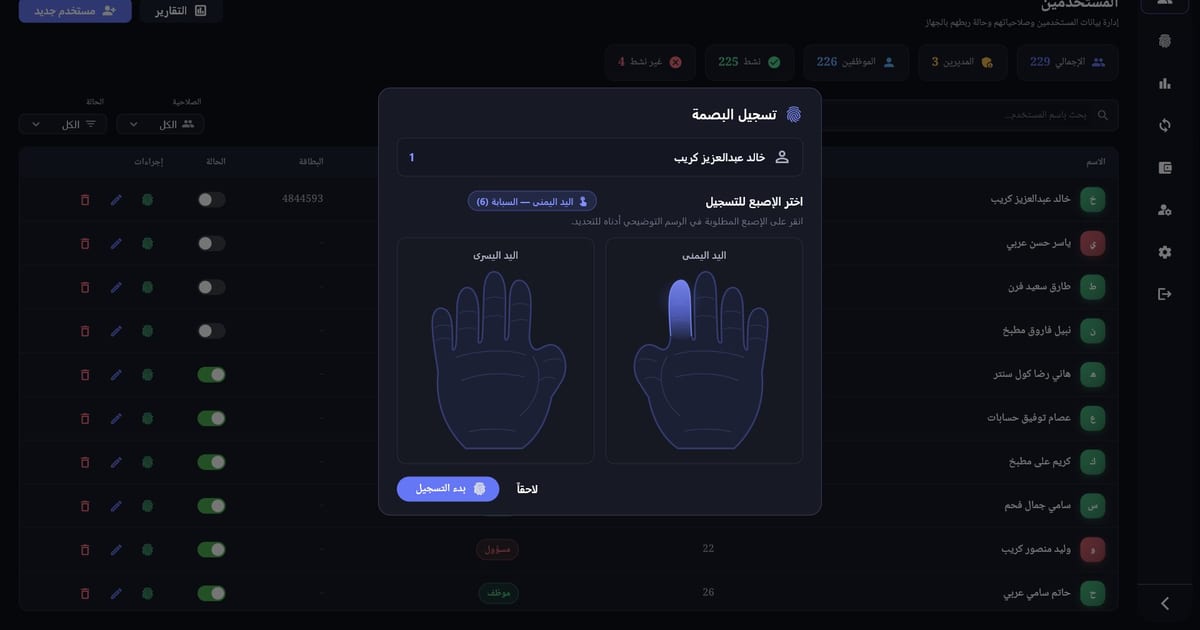
  • Enroll fingerprints remotely with a visual hand picker, live progress, and clear outcomes for done, already used, timeout, or unsupported.
02

One trusted record for people and attendance

Employee data, device records, and manual corrections stay in one place, with a clear source for every punch.

  • Search staff live and filter by role, active status, or department, with headcount totals at a glance.
  • Block duplicate IDs with a suggested next free ID; removing staff from the device keeps full history and restores in one click.
  • Deleted staff stay out of payroll until restored, while departments and four device roles are maintained inline.
  • Review attendance in one table with source labels — Device, Manual, Edited, or Deleted — and keep the original time plus who changed it after an edit.
  • Flag repeated check-ins, check-outs without a check-in, and missing check-outs automatically, with a problems-only view and the expected action.
03

Daily supervision that surfaces absences first

Supervisors see who is present, who left, and who never arrived, with hours that hold up for overnight shifts.

  • See Present, Left, Absent, or Incomplete for every employee, with absent staff sorted first.
  • Count true worked hours across overnight shifts, including a checkout that falls on a different day.
  • Search by name and switch between all employees and present only.
  • Block future dates so attendance cannot be recorded ahead of time.
04

Payroll preparation backed by evidence

Turn attendance into a closed period with day-level detail, absence categories, overtime, and a net figure finance can defend.

  • Set an hourly rate in EGP, optional insurance, weekly or monthly cycle, and required days/hours per employee — auto-saved and hidden from the Accountant role.
  • Close a period with a day-by-day table: in, out, duration, daily wage, overtime balance, and overtime value.
  • Track attended days, full days, total hours, and absences split into Vacation, Excused, and Unexcused.
  • Compare actual and expected pay, then review bonuses, advances, manual deductions, absence deductions, overtime, and net; debts stay informational.
  • Edit day notes, absence types, discounts, and overtime inline; advances, bonuses, and deductions keep version history and soft-delete audit badges.
05

Debt collection with a complete audit trail

Collect in parts, correct mistakes without deleting history, and answer “what happened to this debt?” at any time.

  • Number every debt automatically with an immutable original amount, an optional due date up to five years, and a reason.
  • Collect any partial amount until paid, block overpayment, and get a duplicate warning for the same amount within 30 seconds.
  • Void a payment with a required reason so the balance returns and history stays; the one-click correction is void plus re-add.
  • Archive or delete with a reason; archived and deleted debts are read-only, and restore keeps the full payment history.
  • See the complete timeline and find records by employee or number, filter by status, sort six ways, and export employee statements to PDF or Excel.
06

Reports, roles, and reliability that hold up

Give every role the access it needs, export reports without losing files, and keep working when the network does not.

  • Generate weekly or monthly employee reports in PDF and Excel, and export all active staff with a pre-export check for missing check-outs or duplicates.
  • Include active, archived, and deleted debts in reporting; reports auto-save with employee and period in the filename.
  • Secure login with encrypted passwords and a role matrix enforced across sidebar and routes: Root, Admin, Accountant, and Cashier.
  • Block inactive accounts and protect the Root account; password changes must be at least six characters and different from the old one.
  • Run as an Arabic RTL, dark Windows app that works offline, activates per machine, keeps a cached license during outages, and backs up automatically on every open.

The product

Inside Attendix

Real screens from the Windows application, from daily supervision and employee records to period closing and reporting.

12 screens

Live simulation

Try Attendix in the browser

Walk through the same daily screens your team would use — attendance, employee records, payroll preparation, and reporting — without installing anything.

Try simulation (opens in a new tab)

Custom software

Have a workflow like this?

If your team works with fingerprint devices, payroll periods, or staff finance, let's talk about the system you need.

Start a conversation